Hubbard
Two places to switch them on
The first is the setup screen you see once, straight after creating an account. Below the age and Terms boxes sits a third box: Email me occasional league news and updates. It starts unticked, and you can finish setup and play without touching it. Tick it and your choice is saved with the date you made it.
The second is your Profile. Open it from the avatar in the header, choose Account, and look for League update emails. The line beside the switch tells you where you stand: On, with a reminder that you can turn them off here or from an email, or Off, you will not receive league update emails. Press the switch to change it. It reads Saving while the change goes through, and a short message confirms League updates are on or League updates are off.
If your saved choice cannot be loaded, the Account section says so and offers Try preference again. It never shows Off just because the read failed, so the switch always reflects what is really saved.
What these emails are, and what they are not
League updates are occasional HubbardGames news, including a nudge when you have not played for a while. They are started by hand, not sent on a timer, so there is no daily or weekly schedule to expect.
Account messages are a separate thing and are not affected by this switch:
- Password reset emails arrive whenever you ask for one, whatever the switch says.
- Confirming your address when you create an account is an account message too.
- Turning league updates off changes nothing about your scores, streak, badges or history.
Two ways to stop them
Every league update email ends with the line You are getting this because you opted in to HubbardGames league updates, followed by an Unsubscribe from these updates link. The plain-text version of the email carries the same link.
The link opens a page headed Stop league update emails? with a single Unsubscribe me button. Nothing happens until you press it. That is deliberate: mail apps and security scanners open every link in a message on their own, and a page that unsubscribed on load would switch people off from emails they had never read. You do not need to sign in, because the link itself identifies your account and nobody else's.
Pressing it twice is harmless. The second press says You are already unsubscribed and keeps the date of the first. An old link from months ago still works. The other way to stop them is simply the Profile switch, and either way you can turn them back on from Profile later.
When a come back and play email can reach you
The nudge goes only to players who have league updates on and have been away for more than a set length of time. The setting used so far is more than five days. Away means no sign-in, no board opened and no board submitted, so a player whose browser stays signed in but who has not touched a puzzle still counts as away, while opening a single board counts as playing.
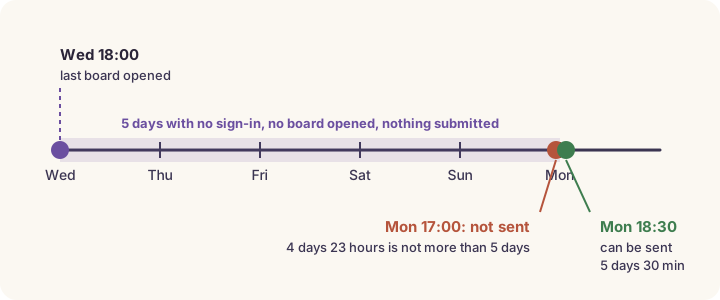
Say you tick the box at setup and your last visit is opening a board on Wednesday at 18:00. A send checked on Monday at 17:00 finds 4 days and 23 hours since then. That is not more than five days, so you are skipped. The same send at 18:30 finds 5 days and 30 minutes, so the email can go to you. The check measures the exact time elapsed rather than rounding to whole days, which is why an hour and a half makes the difference.
The list is worked out again at the moment of sending, not taken from an earlier preview. If you open a board ten minutes before a send, you are dropped from it. Each nudge email goes to a player at most once, and test accounts never receive one.
Which setting suits you
Leave it off if you visit most days anyway: you will not miss anything, since every new daily appears on Today at midnight London time whether or not you have email on. Turn it on if you play in bursts and would like one reminder after a quiet spell, or want the occasional piece of league news. You can change your mind as often as you like.
Put it into practice
Explore the league and find a puzzle that suits you.
Open your ProfileSign in or create an account to save your progress.