Hubbard
Why install it at all
An installed copy opens straight onto Today without an address bar or browser tabs around it, and it sits on your home screen beside everything else you open each morning. That is the whole benefit. It is the same site, the same account and the same boards as hubbardgames.com in a browser tab.
It also loads quickly. The installed site keeps a saved copy of its own pages and fonts on the device, so the frame appears at once and only the day's puzzles and standings have to come over the network.
On an iPhone or iPad
Use Safari, which is the browser Apple supports best for this.
- Open hubbardgames.com in Safari.
- Tap the Share button, the square with an arrow pointing up.
- Scroll down the list and tap Add to Home Screen.
- Keep the name HubbardGames or shorten it, then tap Add.
On an Android phone
In Chrome, open hubbardgames.com, tap the three-dot menu at the top right and choose Install app or Add to home screen, whichever your version shows. Confirm, and the HubbardGames icon appears with your other apps. Other Android browsers usually have the same option in their main menu.
On a computer
Chrome and Edge can install it as a desktop app. Open hubbardgames.com and look for the install icon at the right-hand end of the address bar, or open the browser menu and choose the install option there. It then opens in its own window and can be pinned to the taskbar or dock. Browsers without an install option still run the site perfectly well in a normal tab.
What installing changes, and what it does not
An installed copy is a shortcut to the same site, so most things stay exactly where they were.
- Your account, results, streak and standings are the same everywhere. They live on your account, never on the device.
- On an iPhone or iPad you will usually be asked to sign in once inside the installed copy, because Apple keeps home screen apps separate from Safari. On Android and desktop you normally stay signed in.
- You still need a connection to play. Boards, results and standings always come from the server, so an installed copy that is offline shows the frame but cannot open a puzzle.
- Installing does not turn on notifications. HubbardGames does not send push notifications. If you want reminders, league update emails are a separate choice you opt into.
- Removing the icon removes only the icon and the saved copy of the pages. Nothing on your account is deleted.
What the New version available card means
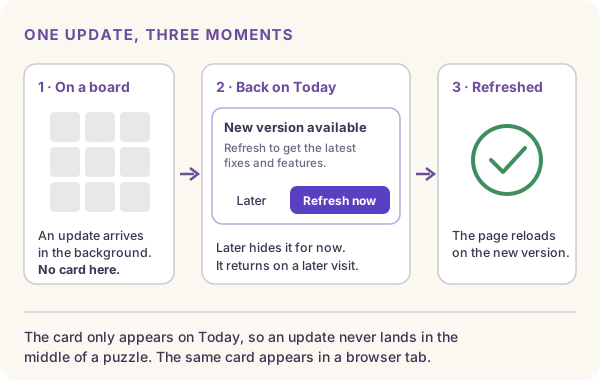
HubbardGames is updated often, and a new version can go live at any time of day. An installed copy, or a browser tab you never close, keeps running the version it started with. When a newer one exists, the site downloads it quietly in the background and then waits for you.
It waits because swapping the code under a running page could interrupt a puzzle you are halfway through. So the card never appears on a board. It appears only on Today, which is the safe place to reload, and it reads New version available with two buttons, Later and Refresh now.
A worked example
Say you opened the installed app on Sunday evening and never closed it. On Monday lunchtime you pick it up again, go to Bridges and start today's board. While you are working, a new version goes live. The site notices and downloads it in the background, but your board stays exactly as it is and your timed attempt carries on normally.
You finish Bridges and tap Today. Now the card appears. Press Refresh now and the page reloads on the new version, which takes a moment. If you would rather carry on, press Later: the card goes away for now and comes back the next time you open Today on a later visit while the update is still waiting.
The site checks for a new version each time it opens and whenever you come back to it from another app or tab, so a copy left running for days still hears about an update the next time you look at it.
If Refresh now does not seem to work
Occasionally a device holds on to the old version after the first press. If the card is still there once the page has reloaded, press Refresh now a second time. The second press clears the saved copy of the site on that device and loads it again from scratch. It does not touch your account.
If you press it and the site has nothing new to give you, you will see a short message saying you are already on the latest version, and the card goes away.
The other card: This page is out of date
A different card can appear on Today in one specific situation: the league's set of competitive games has changed since your copy of the site started. It reads This page is out of date, and asks you to refresh to see today's full set of games.
21 September is the kind of day it exists for. Traffic joined that morning as the tenth competitive daily, and a copy of the site started before then did not know Traffic was a league game. Rather than quietly show the wrong set of boards, Today says the page is out of date. One refresh fixes it.
A common mistake
Deleting and reinstalling the app to get an update. It is never needed, and on an iPhone it means signing in again. Go to Today and press Refresh now instead, or close the app fully and open it again, which loads the waiting version the same way.
Put it into practice
Explore the league and find a puzzle that suits you.
Open TodaySign in or create an account to save your progress.