Hubbard
Where the panel is
Open Profile and choose Appearance from the row of section buttons. If you are already on the Profile overview, the Make it yours card goes to the same place. You can also go straight there with /profile?view=appearance.
The panel opens with a status line telling you which edition is in use, then a grid of twelve edition tiles, then three small preference groups underneath: Colour, Motion and Avatar finish. Every edition has a light and a dark version, so the tiles are showing you a theme rather than a brightness.
Tapping a tile is a preview, not a save
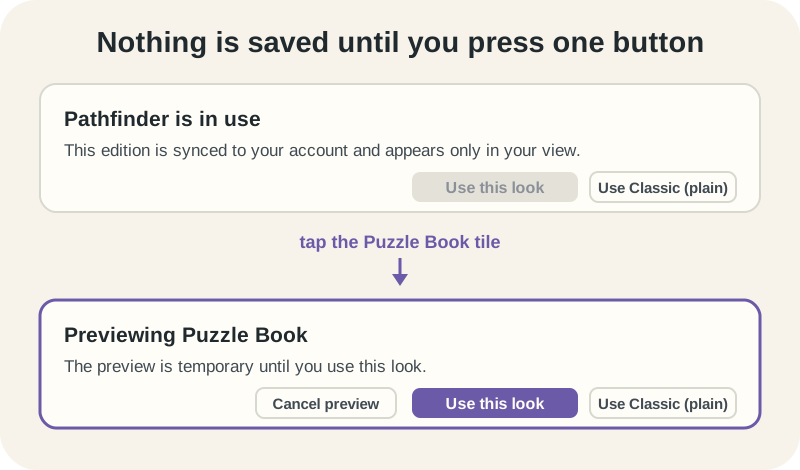
Selecting an edition repaints the page immediately, but nothing has been written down yet. The status line switches from Pathfinder is in use to Previewing Puzzle Book, a Cancel preview button appears, and Use this look becomes available. Until you press Use this look, your saved edition is untouched.
There is a third button, Use Classic (plain), which saves the plain HubbardGames look in one step. It is greyed out when Classic is already your saved choice, which is a reliable way to check what you actually saved.
An unsaved preview does not survive leaving the panel. Navigate away to play a puzzle and you come back to your saved edition, not the one you were trying out.
Five editions are open to everyone
Classic, Puzzle Bloom, Puzzle Book, Pathfinder and Glass Lab are free for every member and marked Included on their tiles. Glass Lab is the default you see before you have saved anything, so a brand new account is not on Classic. If you want no decorative theme at all, Classic is a choice you have to make rather than a state you start in.
The other seven tiles are attached to a specific achievement. A locked tile cannot be selected or previewed, and it says what would open it: Unlock with Specialist or an Admin gift, for example. The full list of which badge opens which edition is in the achievements guide.
Whatever you pick, it appears only in your view. Nobody else sees your edition, and there is no shared or public version of it.
Two choices follow the account, two follow the device
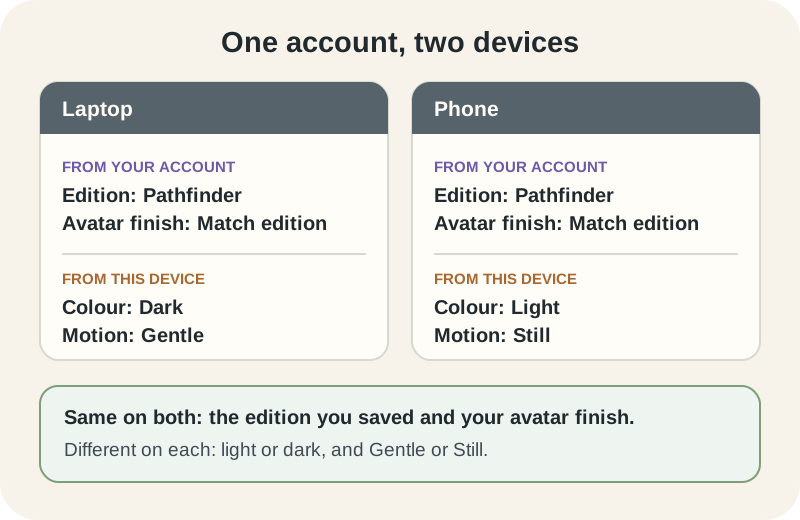
The edition itself is saved to your account, so signing in on another device brings it with you. Avatar finish, which is the Match edition or Plain toggle for your own avatar, is also saved to your account, and it is private to your view: it never changes how other players see your avatar on the league tables.
Colour and Motion are different. Light or dark stays on the device you set it on, and so does Gentle or Still. That is the whole explanation for the usual confusion, which is a phone showing the right edition in the wrong brightness.
A short walk-through
Sign in on a laptop and open Profile, then Appearance. Tap Puzzle Book. The page turns to squared paper and the status line reads Previewing Puzzle Book. Decide against it and press Cancel preview, which puts you straight back.
Tap Pathfinder instead and press Use this look. The status line now reads Pathfinder is in use, with the note that it is synced to your account. Set Colour to Dark while you are there.
Now open the site on your phone. Pathfinder is already applied, because the edition came from your account. The phone is still in whatever brightness it was in before, because Dark was set on the laptop. Set Colour to Dark again on the phone and both devices match.
Motion, and when Gentle is overruled
Gentle adds slow background atmosphere to an edition. Still removes edition animation and leaves the theme in place. Neither setting adds sound, and no edition has any.
If your device asks for reduced motion in its own accessibility settings, that wins. The panel says so directly in that case, replacing the usual description with a line explaining that the device keeps edition motion still even when Gentle is selected. You do not need to change anything in HubbardGames for it to be respected.
Below the editions there is a separate panel of optional visual extras, with a single control to turn all of them off. Those follow the same Gentle or Still setting.
What an edition is not allowed to do
Editions are visual only. They never change puzzles, points, places or shares, and they never add sound. The panel states this at the bottom, and it is a design rule rather than a current limitation.
Practically, that means no edition makes a board easier or harder, none of them affects your result or where you finish in the day's field, and a shared result looks the same whichever one you are using. Picking a decorated edition costs you nothing competitively, and picking Minimal Focus gains you nothing competitively either.
Two things that catch people out
Neither of these is a fault, but both send people to the panel a second time wondering what went wrong.
- A preview that you never saved is gone the moment you leave the panel, so if a look you liked has vanished, you probably previewed it rather than pressing Use this look.
- Light or dark does not travel between devices, and neither does Gentle or Still. Set those once on each device you play on.
Put it into practice
Explore the league and find a puzzle that suits you.
Open your Appearance panelSign in or create an account to save your progress.