Hubbard
The number you are ranked on is not held in your browser
The seconds ticking up on screen are a copy. The real total belongs to the attempt on your account, and the page tops it up in instalments: one every fifteen seconds while you are playing, and one immediately whenever you leave the board.
Two things follow. Reloading the page does not hand you a fresh clock, because the page asks the server where you were and carries on from there. And nothing you can do in the browser will give you a faster time, because the server only ever adds seconds, never removes them, and refuses to add more than two minutes in any single instalment.
It stops when the page is hidden
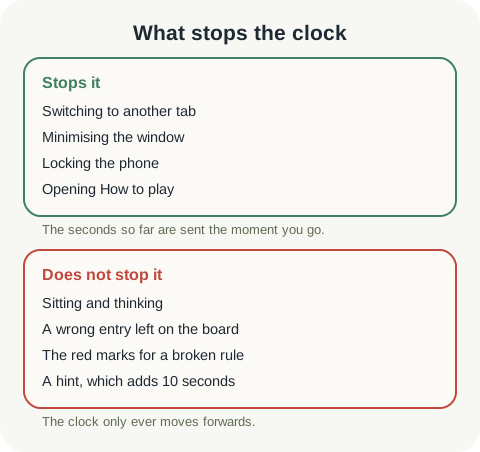
Switch to another tab, minimise the window or lock your phone, and the board notices. The clock stops, and the seconds since the last instalment go off straight away rather than waiting for the next one. When you come back it picks up from that number.
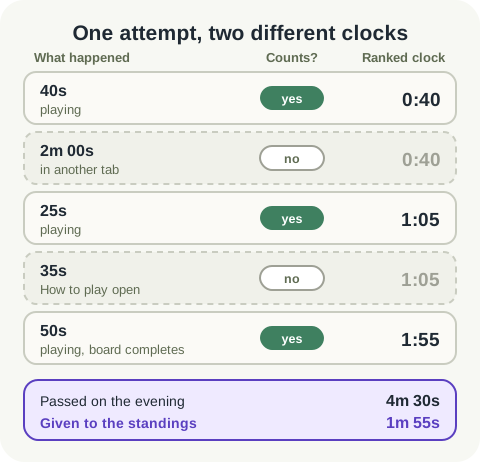
So the answer to the doorbell question is that you can go. Below is an attempt built to show the arithmetic: forty seconds of play, two minutes in another tab, twenty-five more seconds, thirty-five seconds with the rules open, then fifty seconds to the finish.
One limit worth knowing about
The browser has to actually treat the page as hidden, and browsers agree on less here than you might expect. Another tab counts. A minimised window counts. A locked phone counts.
A desktop window sitting behind another window is the uncertain case: some browsers report it as hidden and some do not. If you are stepping away from a ranked board for more than a moment, switch to another tab rather than clicking on something else and leaving the board on show.
Reading the rules is free
Every play screen has a question mark button beside the board, labelled How to play. While that panel is open the clock is paused, so checking whether blooms are allowed to touch diagonally costs you nothing.
The first time you ever open a game, the panel opens by itself, and the clock has not started counting against you while you read. That counts any earlier go at the same game, including a Practice board or one you opened and abandoned, so the automatic rules turn up once per game rather than once per competitive board.
What does not stop it
Thinking. A wrong entry sitting on the board while you work out what to do about it. The red marks that appear when two blooms share a row, which tell you the board breaks a rule and deliberately say nothing about where the answer is.
A hint does not stop it either. On a timed game a hint adds ten seconds to the clock you are ranked on, and the guide below works out what that is worth in points. Giving up ends the attempt and shows you the finished board, and the attempt scores nothing.
The last instalment, and why your result matches the table
A timed grid submits itself the moment it is complete and free of rule conflicts, so the second it would take you to find a Check button is not charged to you.
Just before that submission goes, the page sends one final instalment and waits for the server to confirm it. That is the reason the time in the panel at the end is the same time that appears on the standings, rather than a second or two under it.
Do not change devices in the middle of one
The clock belongs to your account. The squares you have filled in do not: they are kept on the device you filled them in on.
Start a Bridges board on your phone, put it down, and open the same board on a laptop, and you get the attempt still running with every second you have already spent, on an empty grid. Finish a timed board where you started it.
Put it into practice
Explore the league and find a puzzle that suits you.
Play today's boardsSign in or create an account to save your progress.