Hubbard
Where Play again appears
Play again lives in the Library, at /archive. Choose a game and each row in its list shows what happened last time you played that board. A row you have not opened says Play, a row you left part way through says Resume, and a row you have finished says Play again.
Two kinds of board qualify: dateless Practice boards, and past dailies in the Catch-up section. A board dated today does not, even when you have already finished it. Today's competitive and Just for fun boards become replayable at the London midnight reset, when they move into Catch-up.
For You never offers a replay. It only serves boards you have not finished, so a solved board has to be reached through the Library.
Finished includes a board you did not solve
Play again appears on any row whose first attempt has ended, and that covers a board you gave up on or ran out of guesses on as well as a board you solved. A solved row shows a green tick with your result beside it. An unsolved one is marked finished in a muted red. Both get Play again.
A board you have only opened does not. If the first attempt is still in progress, the row says Resume, and resuming carries on that first attempt rather than starting a replay.
How a replay plays
A replay is the same board with a fresh attempt. Your earlier entries are not carried over, and a timed board starts its clock again from zero.
You can leave a replay half done and come back to it. Only one replay of a board can be open at a time, so pressing Play again on that row a second time returns you to the unfinished replay instead of starting another. Once a replay ends you can press Play again and begin a new one. There is no limit on how many times you replay a board.
One visible difference: the finishing extras from your Profile appearance settings do not play at the end of a replay. The ordinary result screen does.
What a replay never touches
Every ranked or counted part of HubbardGames reads your first attempt and skips replays. That is deliberate. A second sitting of a board you have already seen is not comparable with anyone's first sitting, so it is kept out of anything that compares players or rewards progress.
- League standings. A past daily cannot score anyway, because a result only counts on the board's own London date, and a replay can only start after that date has passed.
- Just for fun standings for the day, for the same reason.
- The Library row. It keeps showing your first result, or finished if the first attempt was not solved.
- Your Profile. Puzzles completed, records and per-game progress count first attempts only.
- Achievements. No badge is earned or lost through a replay.
- The finishing times shown beside a Practice board, which list each player's first finish.
- Your streak. A replay fills no streak day, since it is either dateless Practice or a past date.
- The order of the Just for fun cards on Today, which ignores replays when it looks at what you have played.
One board, played twice
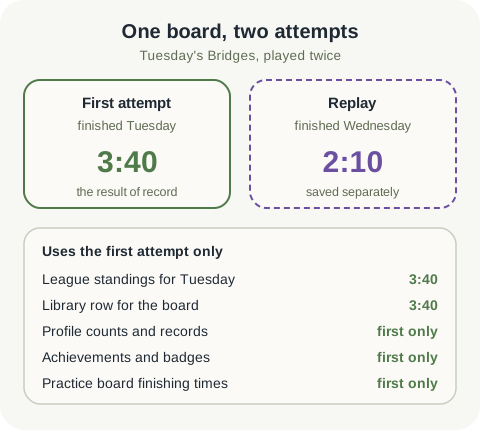
Say you finish Tuesday's Bridges on Tuesday evening in 3:40. That is a same-day competitive finish, so it takes its place in Tuesday's field and earns its points.
On Wednesday, Tuesday's Bridges is in the Library under Catch-up with 3:40 on its row and Play again beside it. You press it, the grid comes back empty with the clock at zero, and this time you finish in 2:10.
Your result screen shows the 2:10. Everywhere else still reads 3:40: Tuesday's standings, the Library row, and your Bridges figures on your Profile. The faster time is yours to know about, but it is not your result of record and nothing ranks it.
The mistake to avoid
The common misunderstanding runs the other way: a player gives up on a Practice board, replays it and solves it, then expects the board to count as completed. It will not. The Library row still says finished in red, the completed count for that game does not move, and any achievement that needs a solved Practice board is still waiting. A replay is practice on a board, not a second chance at its first result.
So if a first result matters to you, for a badge or for your own records, treat the first attempt as the one that counts, and open a board when you have time to finish it.
When a replay is worth it
If you would rather have a board you have never seen, press Play on an unopened row in the Library or open For You, which only ever hands you unfinished work.
- Learning a game. Replay a board you struggled with straight after, while you still remember where you went wrong.
- Checking a technique. Solve the same position again with the approach from a guide and see whether it holds.
- Beating your own time. The replay's result screen tells you how you did against yourself, with no effect on anyone else's table.
- Revisiting a favourite board from Catch-up after the day has closed.
Put it into practice
Explore the league and find a puzzle that suits you.
Open the LibrarySign in or create an account to save your progress.