Hubbard
Where they live
Both are tabs in the main navigation, alongside Today, Board and Challenges. On a phone they are the last two items in the bottom bar; on a wider screen they sit in the top bar. Library is at /archive and For You is at /feed.
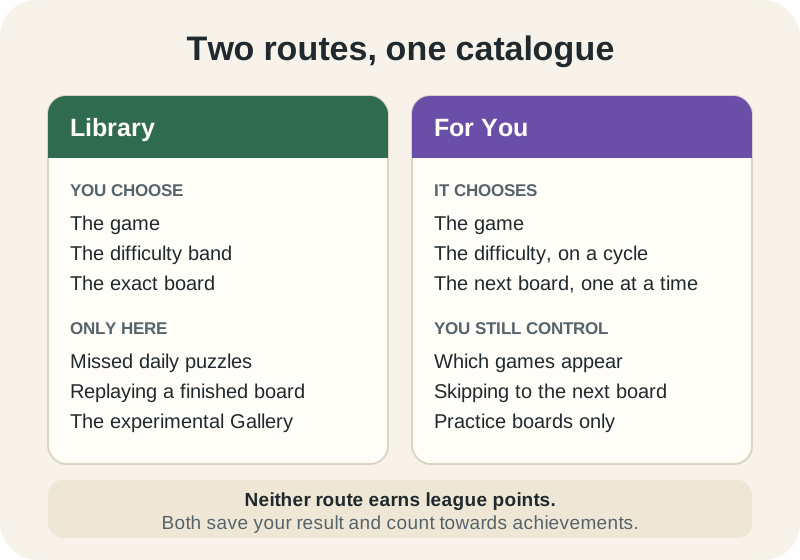
Neither route pays league points. That is the point of them. League points come only from a competitive daily finished on its own London date, so everything in the Library and everything For You serves is play for its own sake, with your result saved and your achievements still counting.
The Library, when you know what you want
The Library opens on a grid of games rather than a grid of puzzles. Each card carries a progress bar and a completed-of-total count, so you can see how far into a game you are before you commit to opening it. There is a search box above the grid if you would rather type the name.
Games are split into two groups. League practice holds the games currently in the competitive rotation. The Puzzle Gallery, marked Experimental, holds the games being tried out for fun, which are never scored anywhere.
Pick a game and you get its boards in difficulty order, eight to a page: Catch-up first, then Easy, Normal, Hard, and where a game has them, the oversized Ultra, Giga and Tera boards. Each row tells you what happened last time, and how many other players have finished that exact board.
- Play, Resume or Play again: the row's action word tells you which state the board is in before you tap it.
- The Show unfinished puzzles only switch hides everything you have completed or failed. It stays where you leave it, because the setting is saved to your account.
- A finished board can always be replayed. A replay is a fresh run and does not overwrite the result you already have.
Catch-up is a Library section, not a For You board
This is the distinction worth taking away. Missed dailies live in the Catch-up section at the top of a game's Library list, each labelled with the weekday and date it ran.
For You never serves them. It draws only from the dateless Practice pool, so a board with a date on it is invisible to it, however many times you press Next. If you are trying to clear last week's Blooms, open the Library, choose Blooms, and look at Catch-up.
A catch-up board still cannot earn league points, because its day has closed. It records your result and it is genuinely worth playing; it just cannot move the standings after the fact.
For You, when you just want the next one
For You makes no menu. Open it and it finds a board, sends you to it, and shows a small bar at the top of the play screen with Library, Controls, Next and a games chooser.
It only offers work you have not finished. A board you have completed is never served again, a board you failed is never served again either, and a board you left half-done comes back as something to resume. It also steers away from the game you have just been playing and from the last two dozen boards it gave you, so you are not handed the same thing twice in a sitting.
Finish a board and the result stays on screen with an eight-second countdown to the next puzzle. Touch anything on that result, or open the standings for the board, and the countdown stops, so reading your own result never costs you the chance to read it.
How For You paces the difficulty
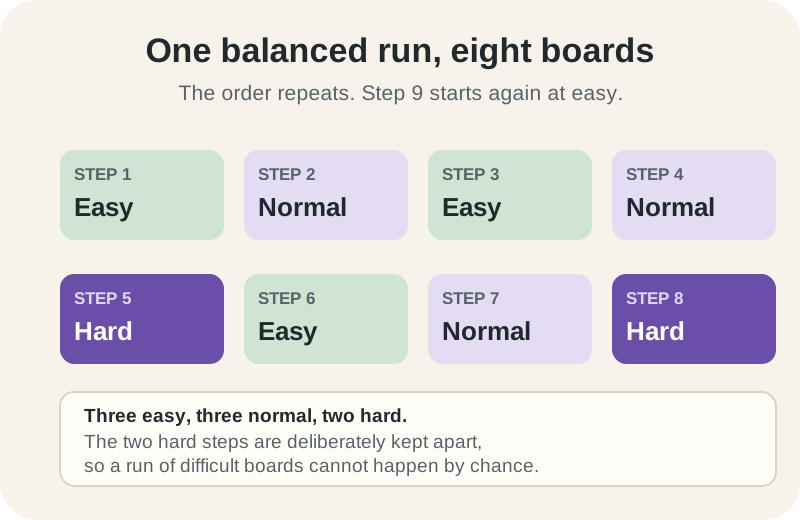
Left alone, For You runs a balanced eight-step cycle rather than picking at random. Three of the eight steps are easy, three are normal and two are hard, and the two hard steps are separated on purpose so a run of difficult boards cannot happen by chance.
Your position in that cycle is stored on your account, not in the browser, so it carries across a break and across devices. Close the tab after step 5 and your next puzzle is step 6, on your phone as much as on your laptop.
If the cycle asks for a difficulty that a game has run out of, the nearest available band is used instead rather than skipping the game.
What you can still change in For You
Tap the settings button at the right of the For You bar and you get the choices. Hiding games is free for everyone: switch off anything you do not fancy and it stops appearing, or pick one game and tell For You to show only that. Both are reversible in the same panel.
Session settings sit in the same place and are part of Plus. Difficulty can be set to a balanced mix, relaxed towards easy boards, challenging towards hard ones, or Expert, which hunts for the advanced Ultra, Giga and Tera boards first. Session length can be left continuous or capped at 3, 5 or 10 finished puzzles, which gives you a clear stopping point instead of an open evening.
Two details about session length catch people out. Skips do not count towards it, only finishes do; and changing the length starts the count again from zero.
Which one to open
The two routes share one catalogue, so progress made in either shows up in the other. Clear a Practice board through For You and it appears as completed the next time you browse that game in the Library.
- You missed a daily: Library, then the Catch-up section of that game.
- You want to get better at one game: Library, then work up its difficulty bands in order.
- You want to beat a board you already finished: Library, then Play again.
- You have ten minutes and no particular plan: For You.
- You want variety without deciding: For You, with the games you dislike switched off.
- You want to try something odd: Library, then the Puzzle Gallery.
Put it into practice
Explore the league and find a puzzle that suits you.
Browse the LibrarySign in or create an account to save your progress.