Hubbard
Where both of them live
Sign in and open Challenges from the main navigation. The page holds three blocks in a fixed order: Rival Week at the top, then Expeditions as three journey cards, then Coach as a single card at the bottom.
The Expedition cards link straight to the journey you tapped, so a card reads Explore journey before you begin, Continue journey once you have started and View your journey after you finish. Coach opens on its own overview. If you would rather skip the middle step, /expeditions and /coach both work as direct addresses.
An Expedition is five stops with a choice at each one
There are three journeys. The Secret Garden walks you to a glasshouse, The Lighthouse Walk crosses harbours and headlands, and The Midnight Observatory ends on a first observation of the night sky. Each has five stops, and each stop offers you a route rather than handing you a board.
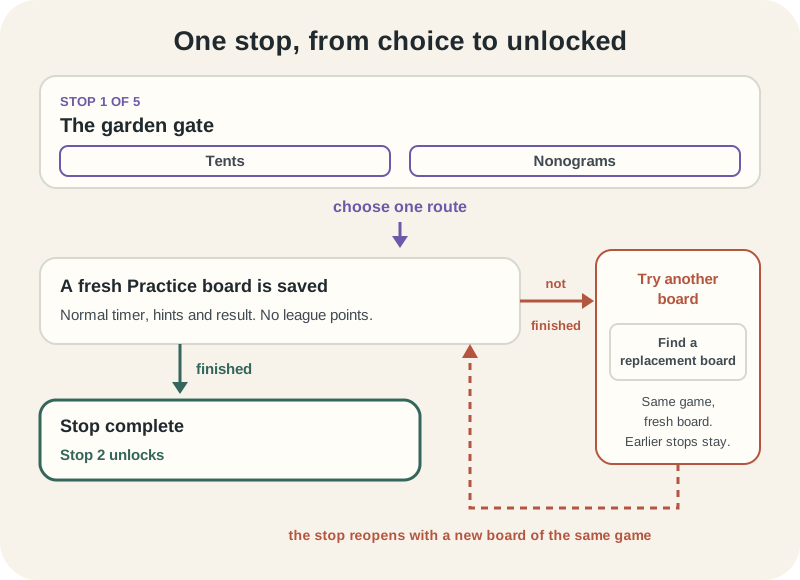
The Secret Garden opens at a stop called The garden gate, where the two routes are Tents and Nonograms. Pick either. The stop after it, The lily pond, offers Light Up or Aquarium. The games behind the two routes are usually quite different from each other, which is the point: a journey is a way to meet games you would not have chosen from the Library.
One real limit worth knowing before you go looking for it. A route disappears if its game leaves the catalogue, and the page only ever shows you routes you can actually play. That is why the Observatory's third stop, The sky chart, currently offers Pipes on its own: its second route was Orbit Shift, which has since been withdrawn from the catalogue. Fourteen of the fifteen stops still give you a genuine choice.
Choosing a route saves a real Practice board
Tapping a route is not a bookmark. It writes a fresh Practice board to your account at the difficulty the journey picked, and the stop then shows that board with its game and level, waiting for you to open it.
What you get is an ordinary Practice puzzle, not a special Expedition mode. The timer runs as usual, hints work as usual, the result screen is the normal one, and you appear in the exact board standings against everyone else who has finished that same board. The only thing it does not do is feed the league. Expeditions add no league points at all.
Finish the board and the stop turns complete, which unlocks the next stop. You can walk away at any point. The choice and the board stay on your account, so coming back a week later picks up where you stopped rather than starting the journey again.
A board that beats you does not end the journey
Give up on an Expedition board and the stop does not lock. It changes to Try another board, with a button that reads Find a replacement board. Press it and you get a fresh board of the same game. Your earlier stops stay complete throughout.
The replacement is the same game, not a second chance at the choice. Once you have picked Tents at the garden gate, that stop is a Tents stop, and every replacement is another Tents board. The route is saved with the journey, and the page says as much if you try to choose again.
There is a second version of this. A board can turn up as Board unavailable rather than failed, which happens when the puzzle behind it is no longer there to play. The fix is the same button and the same promise about earlier stops.
Every board you have been through at a stop is kept. A collapsible line reads Earlier boards at this stop with a count, and opening it lists each one in order with what happened to it.
Milestones, and the thing waiting at the end
Some stops carry a milestone, shown as a line at the bottom of the stop. Before you get there it reads Milestone ahead and names what is coming; afterwards it reads Milestone reached. In The Secret Garden the line after the lily pond is The pond is behind you, and the line after the sculpture court is The glasshouse comes into view. They are a bit of narrative rather than a reward.
Finish all five stops and the journey's keepsake changes from At the destination to Your souvenir. The Secret Garden's is the Glasshouse Keepsake, the coastal walk gives a Lighthouse Keepsake and the observatory gives a Starlight Keepsake.
Be clear about what a keepsake is and is not. It sits in a private collection on the Expeditions page and nowhere else. It adds no league points, and it is not a public badge, so it will not appear beside your name on the Board or in your showcase. If you want something other players can see, achievements are the place to look.
Coach is three small boards that will explain themselves
Coach covers three games at deliberately small sizes: More or Less at three by three, Light Up at five by five and Nonograms at five by five. More or Less is the game some people still know as Futoshiki, and the Coach card says so.
Press Start a small lesson on any of the three and you get your own board. There is no clock on it, no score, and no ranked result at the end. It is the one place on the site where finishing slowly costs you nothing, because nothing about the lesson is measured.
Each lesson is saved on its own and can be left half finished. Your Recent lessons list holds your active lessons first, then the most recent finished ones, up to thirty in total. Tapping View lesson on any of them puts you back in the same board with the same entries.
The three rungs: nudge, rule, one step
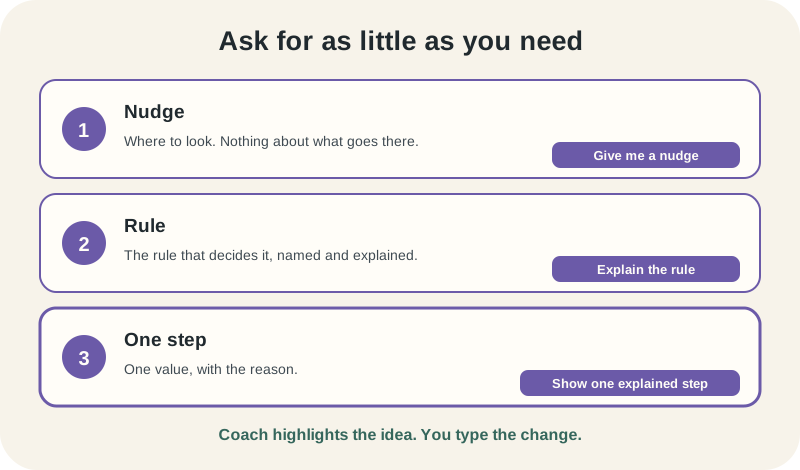
The hint button climbs a ladder rather than repeating itself. The first press reads Give me a nudge and highlights a square worth looking at, along with the clues that meet there, without saying anything about what belongs in it. The second press, Explain the rule, names the rule that settles that square. The third, Show one explained step, gives you the value with the reasoning behind it. After that the button stops, because there is nothing further to offer on that square.
At every rung Coach highlights the idea and leaves the entry to you. It never fills a square in, and the rest of the board is untouched, so the step you were given is one move rather than a solved puzzle.
There is a second kind of hint you will meet if something on your board is already wrong. Instead of pointing forward, Coach switches to Review these entries and marks the ones that need another look, on the reasonable grounds that there is no useful next step to take from a board that has gone astray.
Check a board that is not right yet and the message is There is still something to work on. No penalty, no attempt counter, nothing recorded.
Which one to open
Open an Expedition when you want a run of Practice boards with some shape to it and you are happy being timed in the ordinary way. It is a good way to get pushed into a game you keep scrolling past in the Library.
Open Coach when a particular game keeps beating you and what you want is the reason rather than the answer. Three by three More or Less is small enough that the whole logic of the game fits on one screen, which is hard to say about a competitive board at eight in the morning.
On access: whether you can start something new is checked against your membership when the page loads, and the page tells you what it found. If the check itself fails, it says so and offers a retry rather than showing you a wall, and your saved progress stays visible either way. Anything you have already started, a stop you have chosen or a lesson you have opened, stays available to you even if your membership changes later.
Put it into practice
Explore the league and find a puzzle that suits you.
Open ChallengesSign in or create an account to save your progress.